

Paper job cards have been a staple in car workshops for decades. But in a busy Malaysian workshop, paper gets lost, handwriting is misread, and customers wait while you search for a card. A digital job card—accessible from your phone—solves these problems. It keeps every repair detail in one place, from the moment a car rolls in until the final payment.
In this article, we'll walk through how a digital job card works, why it's better than paper, and how you can start using one today. No technical jargon—just practical steps for your workshop.
What Is a Digital Job Card?
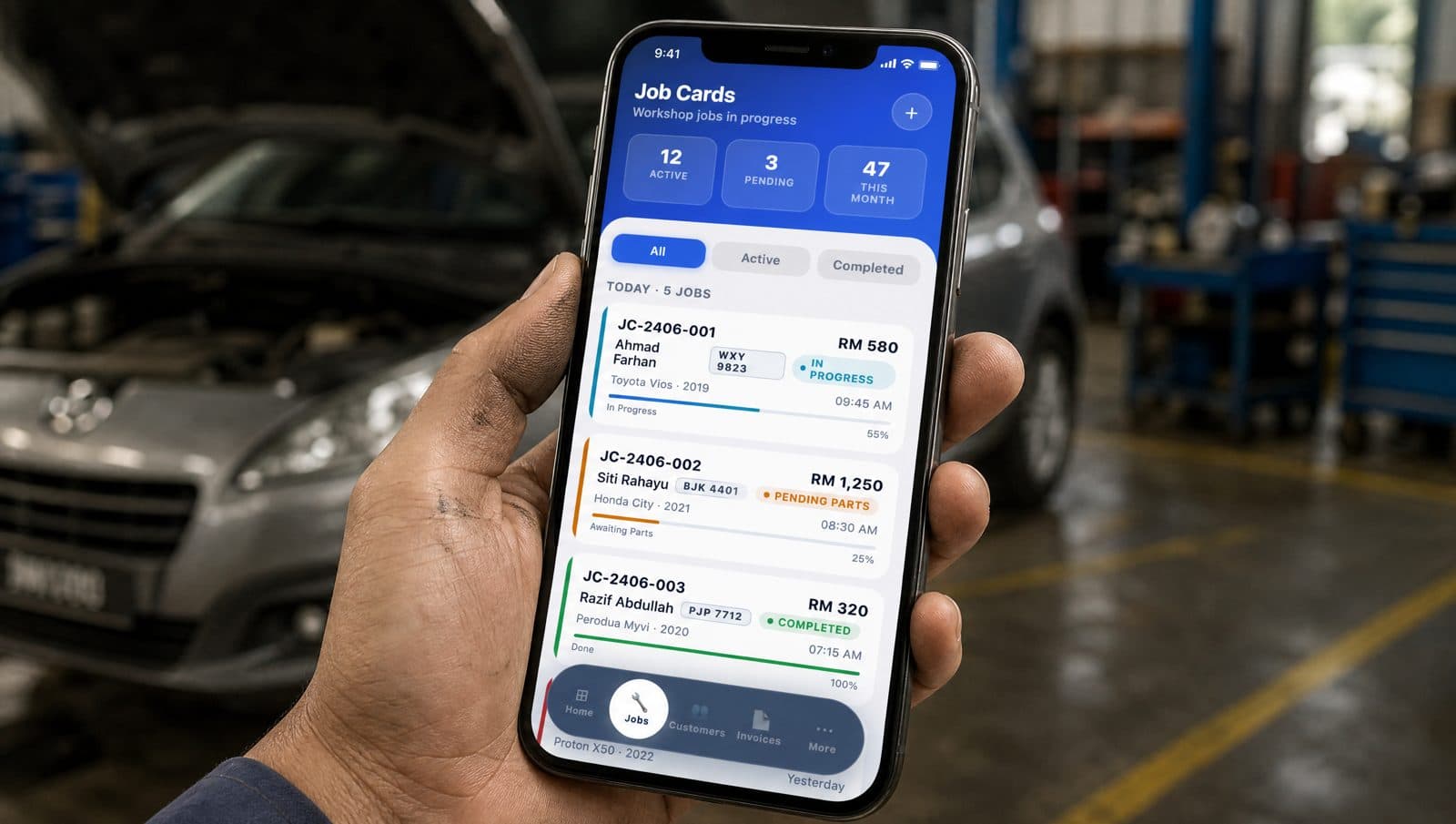
A digital job card is an electronic record of a vehicle's repair job. Instead of writing on a pre-printed form, you type or tap on a smartphone or tablet. The card captures the customer's complaint, the work items needed, the status of each task, and photos of the vehicle. Everything is stored in the cloud, so you can access it from anywhere.
For example, when a customer brings in a Proton Saga with a noisy engine, you open a new job card on your phone. You type the complaint, add work items like "check engine mount" and "replace oil filter," assign a mechanic, and take a photo of the engine bay. The card updates in real time as work progresses.
From Check-In to Payment: Step by Step
Here's how a typical workflow looks with a digital job card:
- Check-in: Customer arrives. You create a new job card on your phone. Enter vehicle number, mileage, and customer complaint. Snap a photo of the dashboard or any existing damage.
- Work items: List all tasks—service, repair, or replacement. For each item, add estimated cost and time. Assign a mechanic.
- Status updates: As the mechanic works, they update the job card: "waiting for parts," "in progress," "completed." You can see this instantly.
- Photos: Take before-and-after photos. For example, a worn brake pad before replacement and a new one after. This builds trust with customers.
- Approval: If additional work is needed, send the customer a WhatsApp message with the photo and quote. They approve digitally—no need to come back.
- Payment: Once all work is done, the job card becomes an invoice. You email or WhatsApp it to the customer. They pay, and the job is closed.
Tip: Use the photo feature for every job. A picture of a leaking hose or a worn tyre speaks louder than words. Customers appreciate seeing what you fixed.
Why Paper Job Cards Fall Short
Paper job cards have several drawbacks that slow down your workshop:
- Lost or misplaced: A paper card can easily slip behind a desk or get mixed up with other jobs. You waste time searching.
- Illegible handwriting: Mechanics and service advisors often rush. Scrawled notes lead to mistakes—wrong parts ordered, tasks missed.
- No real-time updates: You have to walk to the workshop floor to ask about progress. Customers call asking for status, and you can't answer immediately.
- Hard to share: To get a customer's approval, you need to call or wait for them to visit. No easy way to send photos or quotes.
- No backup: If a paper card is lost, you've lost the job history. No record for warranty or future service.
Digital job cards eliminate all these issues. Everything is saved automatically, and you can pull up any job from your phone in seconds.
Features That Make a Digital Job Card Powerful
Not all digital job card systems are the same. Look for these features to get the most out of yours:
- Mobile-first: You and your mechanics should be able to use it on a phone. No need for a desktop or tablet.
- Photo capture: Take and attach photos directly to the job card. Customers can see what you see.
- Status tracking: Each work item has a status—pending, in progress, completed. You know exactly where each job stands.
- WhatsApp integration: Send job cards, quotes, and invoices via WhatsApp. Most Malaysians use WhatsApp daily, so this is a natural fit.
- Inventory link: If you track parts, the job card can deduct items from your inventory automatically. No double entry.
- E-invoice ready: For SST and LHDN compliance, the system should generate proper invoices. MekaHub, for example, supports MyInvois e-Invoice.
How to Get Started with Digital Job Cards
Switching from paper to digital doesn't have to be complicated. Follow these steps:
- Choose a system: Pick a workshop management app that offers digital job cards. MekaHub is built for Malaysian workshops and works on any phone.
- Set up your team: Add your mechanics and service advisors. Assign roles—who can create cards, who can update status, who can approve payments.
- Create a template: Define common job types like "regular service," "aircond repair," "tyre change." Each template can pre-fill work items and estimated times.
- Start small: Use digital job cards for one or two mechanics first. Get comfortable, then roll out to the whole workshop.
- Train your staff: Show them how to create a card, take a photo, and update status. It takes less than an hour to learn.
- Go live: On day one, create all new jobs digitally. Keep paper as backup for a week, then switch fully.
Tip: Involve your mechanics early. Show them how digital job cards reduce their paperwork and make it easier to communicate with service advisors. When they see the benefit, adoption is smooth.
Real Benefits You'll Notice
Workshops that switch to digital job cards report several improvements:
- Faster check-in: Creating a card takes 30 seconds instead of 2 minutes of writing.
- Fewer mistakes: No misread handwriting. Work items are clear, and parts are ordered correctly.
- Better customer communication: Send a WhatsApp update with a photo. Customers feel informed and trust you more.
- Improved workflow: Mechanics know exactly what to do next. No waiting for instructions.
- Accurate billing: All work items are tracked, so you never forget to charge for a task.
- Easy record keeping: Job history is stored forever. Need to check what you did six months ago? It's in your phone.
Digital job cards are not just a fancy replacement for paper. They are a tool that makes your workshop run smoother, your team more efficient, and your customers happier. And with a mobile-first app like MekaHub, you can start today without any big investment.
Ready to go digital? Try MekaHub for free and see how a digital job card can transform your workshop.
Run your workshop from your phone.
Seven days free. No credit card. Set up your first customer, vehicle, and job card in about fifteen minutes.